7/16/2025

AB
What Is an Operations Intelligence Layer? A Better Alternative to Dashboards
Discover why traditional dashboards fall short in real-time ops. Learn what is an Operations Intelligence Layer and how it transforms data into actionable insights.
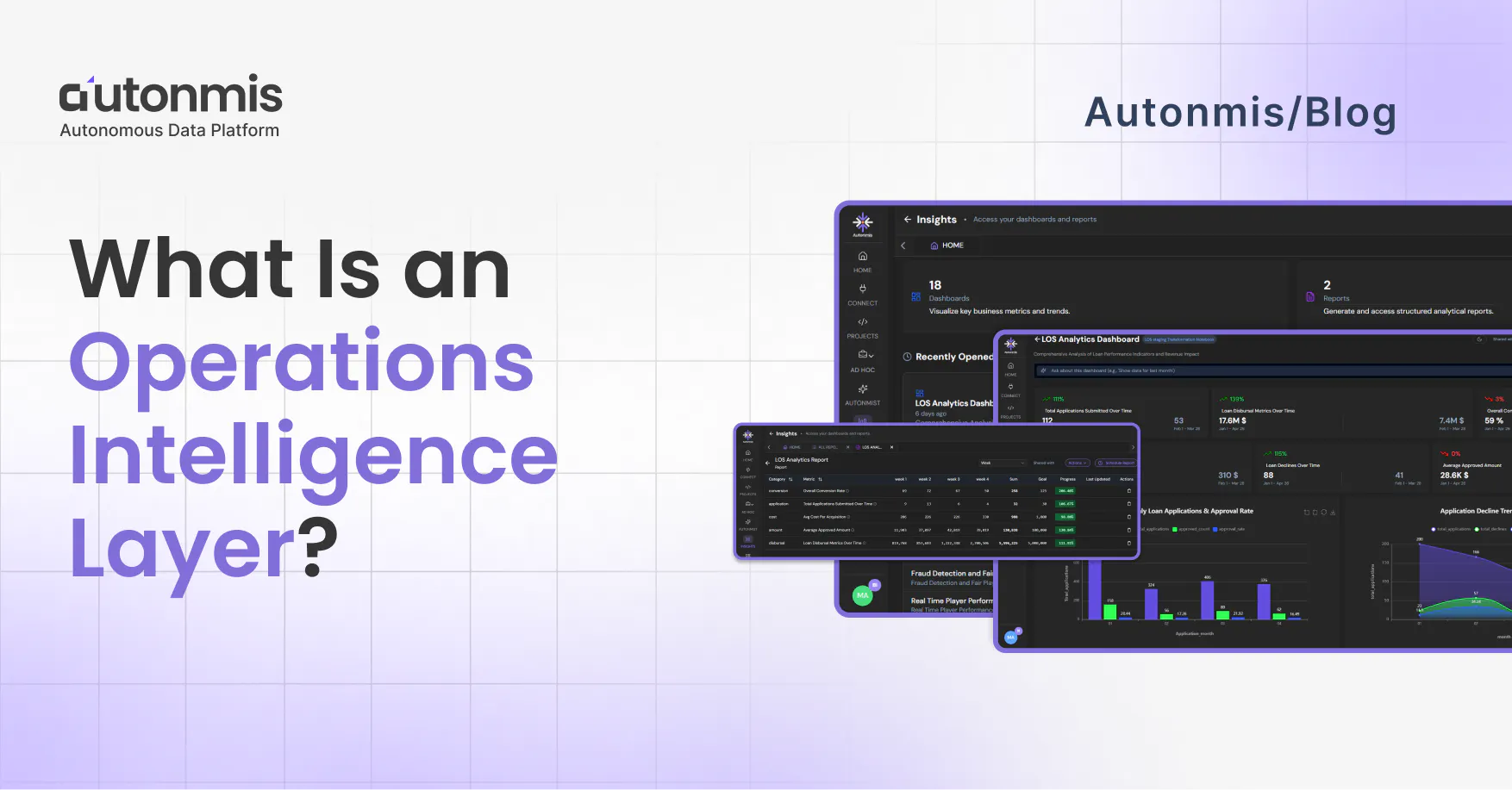
What is an Operations Intelligence Layer?
An Operations Intelligence Layer is the infrastructure that sits between a company's raw operational data and the people who need to act on it. It monitors events continuously, applies business rules, surfaces exceptions ranked by impact, and routes them to the right owner - automatically, without waiting for someone to open a dashboard. It is the difference between being told what happened and being told what needs to happen right now.
You’ve relied on dashboards for years. They give you charts, graphs, and color‑coded alerts. Yet somehow, your team still scrambles when something breaks. That’s because dashboards are built to show you what happened - not to help you act in the moment.
An Operations Intelligence Layer sits above your data pipelines and tools. It watches every event in real time, applies your business rules, and nudges people or systems to respond without waiting for someone to refresh a chart. It’s the modern foundation of Business Operations Intelligence, where insight leads to action, not just observation.
IDC research on operational efficiency found that the average mid-market operations team discovers critical workflow exceptions 24-48 hours after they occur. In high-transaction environments, payments, lending, collections, that lag is where customer impact compounds. An operations intelligence layer closes this gap by removing the human chain between detection and response.
(Source: IDC, "Worldwide Intelligent Process Automation Forecast, 2024–2028")
Why Dashboards Often Fall Short
- Time lag: By the time data makes it onto a dashboard, the problem may already be out of hand.
- Too much noise: You see every metric, but it’s hard to know which ones really need attention right now.
- Manual work: Someone still has to open tickets, ping a Slack channel, or write an email to get things moving.
- Siloed views: Each team - finance, support, product uses its own dashboard, so no one has the full picture
“We spent more time debating what the data meant than fixing the problem.”
- Ops Lead at a midsize SaaS company
Operations Intelligence Layer vs Dashboard:
A dashboard is passive. It sits there until someone opens it. When they do, it shows them aggregated metrics from the data that has been processed. If something went wrong at 11pm, the dashboard shows it at 9am when the ops lead logs in. The response chain then starts: someone notices, someone raises a ticket, someone investigates.
An operations intelligence layer is active. It watches every event as it happens, applies the business rules you define, and surfaces exceptions to the right person the moment they cross a threshold. The ops lead does not open the layer at 9am and discover the 11pm problem. They got a notification at 11:04pm with the context they needed to act.
On ownership: Dashboards show a metric to everyone who opens them, which in practice means no one owns the response. An operations intelligence layer routes each exception to a specific person with an SLA clock attached. If that person does not act within the window, it escalates automatically.
On off-hours: Dashboards require a human to be watching. An operations intelligence layer does not. This is why the same exception caught at 11pm is a 10-minute fix, and caught at 9am Monday is a weekend worth of compounding damage.
How an Ops Intelligence Layer Changes the Game
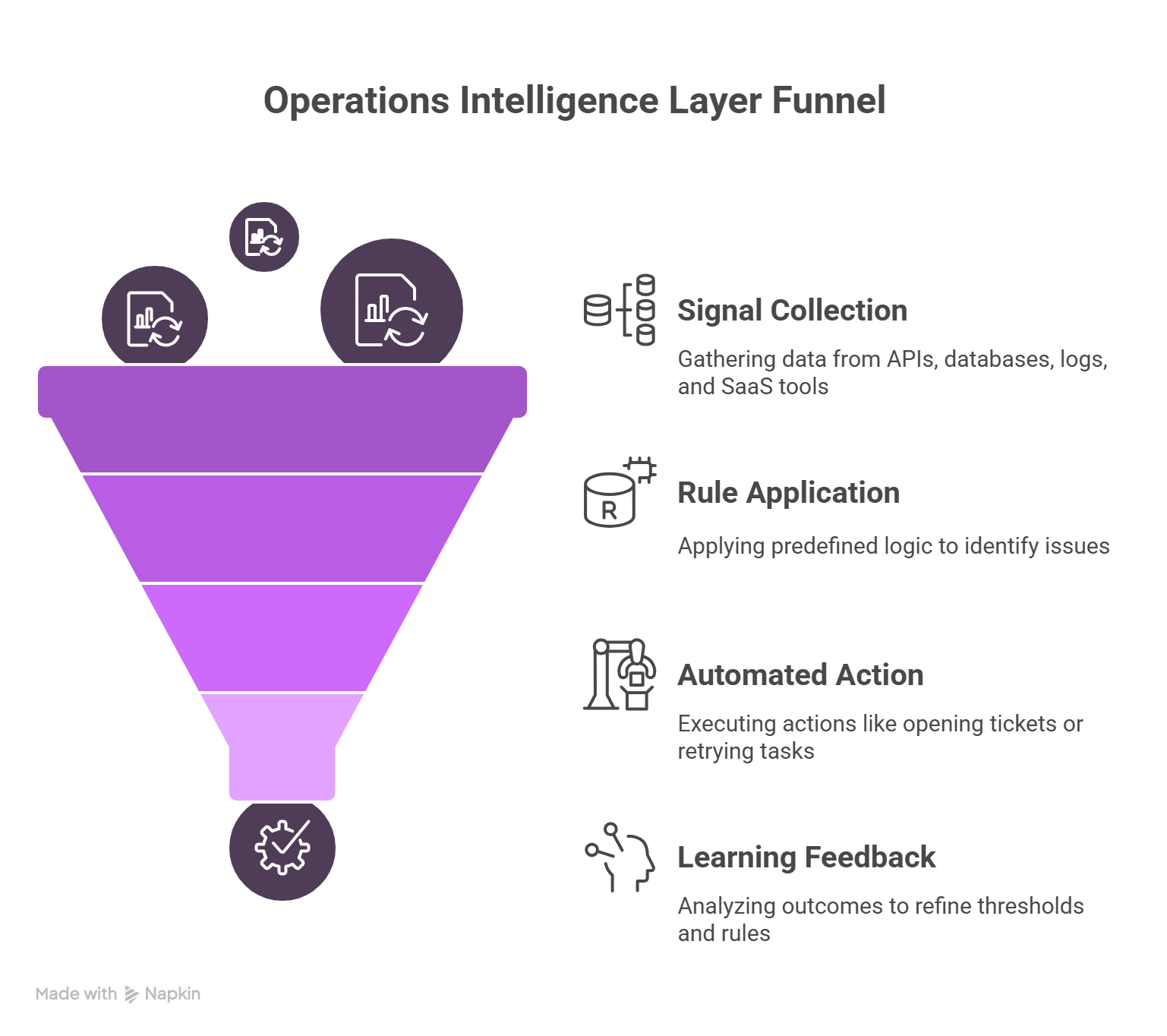
Instead of waiting for a person to notice an issue, this layer:
- Listens to every signal.
It taps into APIs, databases, logs, and SaaS tools, collecting events as they happen. - Applies clear rules.
You define logic say, “flag any payment that fails twice in a minute” or “alert if server CPU stays above 85% for five minutes.” - Takes action automatically.
When a rule fires, it can open a Jira ticket, post to Slack, retry a failed task, or even call a remediation script. - Learns over time.
Each action’s outcome - true issue or false alarm - feeds back into the system, so thresholds adjust as your operations mature.
It’s a natural evolution from static dashboards to Operations Intelligence Layer that works in real time, not just reports the past.
Checkout: What Is AI Data Analytics? Why it Matters
A Simple Example: Handling Stuck Payments
- Old approach (dashboard):
Every morning, someone checks the payment-failures chart. They spot a rise, raise a ticket, wait for engineering to investigate and by then some customers have churned. - With an Ops Intelligence:
Three failed payment attempts within two minutes automatically trigger a retry and alert the payments team. The account manager sees a Slack message, reaches out to the customer if needed, and revenue keeps flowing.
This is Operational Intelligence in action not just knowing, but fixing before it’s too late.
Bringing Teams Together
Because the Operations Intelligence Layer works across your whole stack, everyone shares the same view:
- Product knows when feature flags cause rollouts to slow.
- Support hears about customer-impacting errors first.
- Finance sees billing hiccups in real time.
- Engineering gets clear, consistent incident reports - no guesswork needed.
This shared visibility strengthens Business Operations Intelligence across teams and silos.
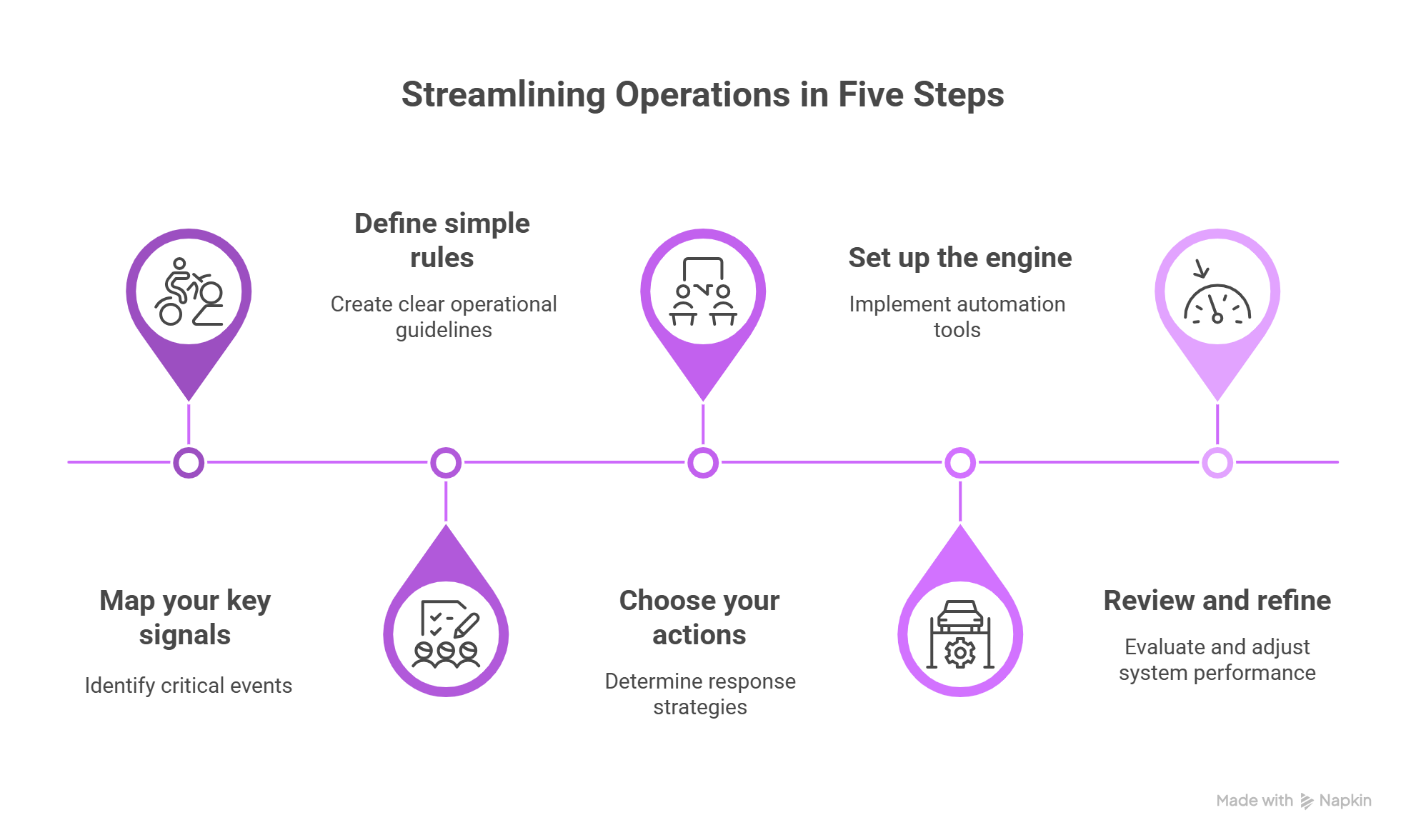
Getting Started in Five Steps
- Map your key signals.
Write down every event that matters - failed jobs, slow database queries, error logs, customer complaints. - Define simple rules.
Think in plain language: “If X happens more than Y times in Z minutes, do A.” - Choose your actions.
Decide who or what needs to move when an issue arises - a person, a team channel, or an automated script. - Set up the engine.
Use a no-code or low-code tool to connect data sources, rules, and actions in a few hours or days. - Review and refine.
After a week, check which alerts were helpful and which weren’t. Tweak your rules and thresholds.
Checkout: What is Generative BI and Why It Matters in 2025?
It Matters Now
Modern work is fast and complex. Systems talk to each other constantly. Waiting for someone to notice a dashboard alert is like missing the stoplight, it slows everything down.
An Operations Intelligence Layer doesn’t just show you problems. It helps you solve them quietly and confidently before they affect your customers or business outcomes.
In Brief
- Dashboards tell you what happened.
- Ops Intelligence helps you act while it’s happening.
When ops, engineering, support, and finance all work from the same real‑time view—and when much of the routine follow‑up happens automatically - you’re building real Business Operations Intelligence into how your teams work.
That’s how you move from reacting to preventing. And in today’s world, that makes all the difference.
How Autonmis Helps
At Autonmis, we built the platform to be the layer between your operational data and the people who need to act on it. It listens to your operational signals, applies logic you control, and routes the right information to the right person before anyone has to go looking.
No heavy setup. No code needed. No waiting for engineering.
Whether you're monitoring disbursal delays in lending ops, catching errors in your billing system, or keeping an eye on delivery SLAs, Autonmis helps you detect, decide, and act faster.
If dashboards have reached their limit, we're here to help you go beyond them.
Frequently Asked Questions
What is an Operations Intelligence Layer?
An Operations Intelligence Layer is infrastructure that monitors business operations continuously, applies rules you define, surfaces exceptions ranked by business impact, and routes them to the right person before anyone has to go looking. It sits between your raw operational data and the people who need to act on it, replacing the human chain of "someone noticed, someone raised a ticket, someone investigated" with a system that handles detection and routing automatically.
How is an Operations Intelligence Layer different from a monitoring tool?
Traditional monitoring tools watch system health - server uptime, API latency, error rates. An Operations Intelligence Layer watches business health - whether a disbursement is going to breach SLA, whether a collections exception needs escalation, whether a reconciliation is off in a way that affects revenue. The distinction is that it understands business context, not just technical signals.
Does an Operations Intelligence Layer replace the data team?
No. It removes the work the data team was never supposed to be doing - pulling the same report every Monday, explaining the same metric to different stakeholders, watching dashboards for exceptions that a system could catch automatically. The work that requires analytical judgment, domain expertise, and interpretation stays with the data team. The mechanical routing work moves to the platform.
How long does it take to get value from an Operations Intelligence Layer?
A meaningful first result - one workflow monitored, exceptions surfacing automatically, right people notified, is typically achievable in two to four weeks for a well-scoped pilot. The common mistake is trying to connect everything at once. Start with the one workflow that causes the most escalations or the most manual triage time. Get that working, then expand.
Recommended Learning Articles

5/30/2026
AB
Why the Same Metric Looks Different Every Time
4/9/2026
AB
What is a governed metric?
Actionable Operations Excellence
Autonmis helps modern teams own their entire operations and data workflow — fast, simple, and cost-effective.